For cleaning, porter, concierge & maintenance teams

Every hour, every building, every dollar in one place.

StaffClock gives your crews a simple phone app to log hours and see their schedule, and gives your office an HR site for approvals, teams, monthly billing, profit and payroll.

Already using StaffClock? Sign in

Built by a New York building-services operator, and used every day to run more than 100 staff across 100+ buildings.

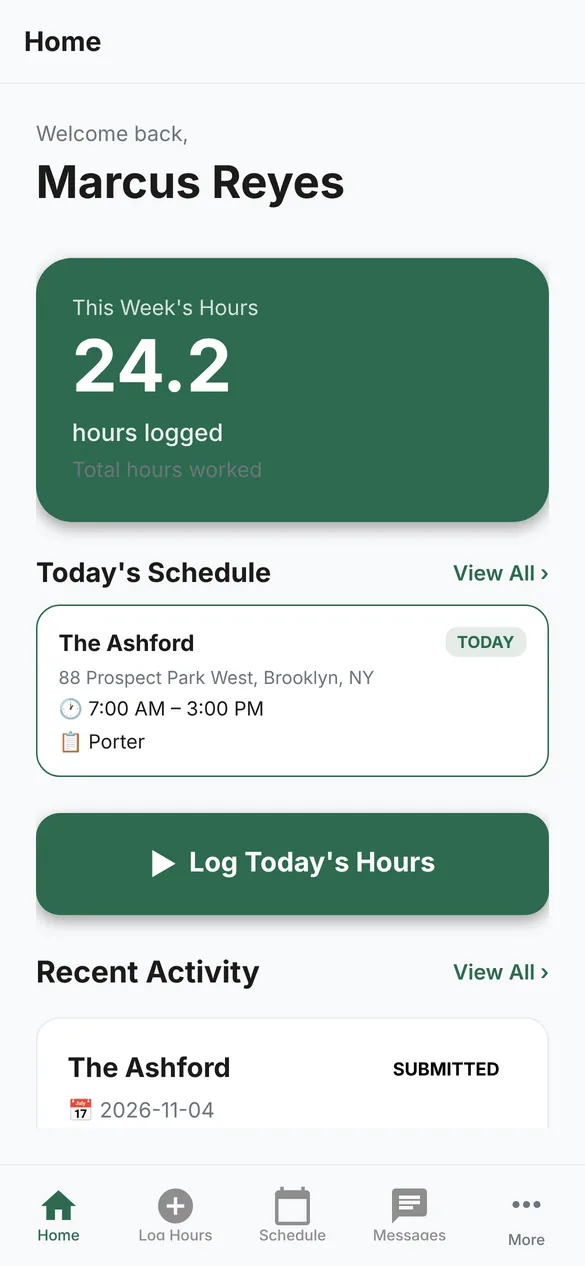
StaffClock phone app home screen with this week's hours and today's schedule
iPhone & Android appStaff log hours and see where they work
HR site for the officeApprovals, teams, billing and reports
Payroll-ready exportsRegular and overtime, to Excel or PDF
Your data, your companyEach company's records kept separate

For the office

Run the week from one screen.

Hours come in from the app as staff log them. Your managers check them, fix what's off and approve, and the numbers flow straight into billing, labor cost and payroll.

01 · Timesheets

Approve a whole week in a few clicks.

See everyone's hours day by day, with overtime and long days flagged. Approve one person, approve everything that has no flags, or open an entry to fix it.

  • Weekly grid per person with totals and overtime
  • Flags for overtime and days over 10 hours
  • "No hours this week" list so nobody slips through
  • Only approved hours go to payroll
02 · Calendar

Know who's working where, today.

A day, week or month view of every person and every building, built from your teams' work days and shift times. Where someone has already logged hours, you see what they actually worked.

  • View by person or by project
  • Different hours on different days, overnight shifts included
  • Filter by employee, project or client
03 · Projects & billing

See what each building earns.

Set each building's billing — a monthly fee, an hourly rate, or both — and the team that works there with their pay. StaffClock shows the monthly bill, labor and profit for every building and every client.

  • Monthly fixed, hourly, or fixed plus hourly billing
  • Work days or visits per week for each building
  • Team pay per building: hourly, per visit, weekly or monthly
  • Group buildings by client
04 · Each building

Everything about a building on one page.

Hours logged, who worked, labor cost and hourly billing for any date range, plus the billing setup and the team — each person's task, days, hours and pay.

  • One person can have several tasks on a building, each with its own pay
  • Assign or remove people without leaving the page
05 · Employees

Your whole roster, with or without the app.

Invite people by text so they can use the app, or add them without app access. Each profile shows their role, pay, buildings, monthly pay, schedule and recent hours.

  • Text invitations with pending-invite tracking
  • Your own list of roles and tasks
  • Manager or employee access for each person
  • New-hire onboarding: a private link for Form I-9 and the New York pay and NYC notices, signed on the phone
06 · Reports

Payroll and profit, ready to send.

A payroll export with regular and overtime hours, rates and gross pay per person for your payroll provider. A monthly P&L by client or building. Hours, overtime and long-day reports whenever you need them.

  • Download for Excel (CSV) or print to PDF
  • Overtime calculated per Sunday–Saturday week
  • Monthly pay by person across all their buildings

The phone app

Simple enough for every crew member.

One app for staff and supervisors. Staff see where they work and log their hours in seconds. Supervisors review and approve from the building.

For your staff

Today's building, hours and task right on the home screen, with a one-tap button to log the day.

  • Log hours for the right building and date
  • Weekly schedule with addresses and tasks
  • Hours history and approval status
  • Messages with the office

For supervisors

The team's hours this week, what needs review, and the schedule — without going back to the office.

  • Approve or edit time entries, one by one or all at once
  • Assign people to buildings and shifts
  • Team hours and approved pay at a glance
  • Export time entries to PDF

How it works

Getting started is simple.

Set up your company

Add your buildings, clients, billing and roles. We can bring in your existing schedule spreadsheet for you.

Invite your team

Staff get a text invite, install the app and see their schedule. People who don't need the app can still be on the roster.

Approve and pay

Hours come in daily. Approve them each week, export payroll, and see billing and profit for every building.

All features

Everything in StaffClock today.

Time

  • Hour logging from the phone app
  • Weekly timesheets and approvals
  • Edit, reject or approve entries
  • Overtime and long-day flags
  • Hours history for every person

Scheduling

  • Day, week and month calendar
  • Work days and shift times per person
  • Different hours on different days
  • Overnight shifts
  • Schedules in the phone app

Buildings & billing

  • Monthly fixed, hourly or both
  • Work days or visits per week
  • Clients to group buildings
  • Bill, labor, profit and margin
  • Archive and restore projects

People & pay

  • Text invitations to the app
  • Employees without app access
  • Hourly, per-visit, weekly and monthly pay
  • Several tasks per person per building
  • Manager and employee access
  • New-hire onboarding by private text link
  • Form I-9 Sections 1 & 2 and NY / NYC notices

Reports

  • Payroll export (regular & overtime)
  • Monthly P&L by client or project
  • Monthly pay by person
  • Hours by project, overtime, long days
  • Excel (CSV) and PDF

Your company

  • Your logo and company details
  • Your own roles and task lists
  • Messages between staff and office
  • Each company's data kept separate
  • One login for app and HR site
Coming next: Time off requestsHandbook sign-offsNY compliance checklist

Questions

Frequently asked.

Who is StaffClock for?

Companies that send staff to many buildings — cleaning, porter, concierge, door and maintenance services — and need to track hours, schedules, pay and what each building is billed.

How does onboarding work?

Text a new hire a private link. On their phone they fill in their details and Form I-9 Section 1 and sign the New York and NYC notices. A manager checks their documents in person, completes Section 2 and approves, and the person is added to your roster. Sensitive numbers are encrypted.

Do all my staff need the app?

No. You can add people without app access and still plan their schedule and pay. Invite them by text whenever you're ready.

Does it run payroll?

StaffClock prepares payroll: approved regular and overtime hours, rates and gross pay per person, ready to download for your payroll provider. Taxes and deductions are calculated by your provider.

Can it handle buildings billed by the month and by the hour?

Yes. Each building can be billed a monthly fee, an hourly rate, or both. Staff only see buildings billed by the hour when they log time.

Is our data kept separate from other companies?

Yes. Every company has its own employees, buildings, clients, roles and settings, and managers only ever see their own company.

Can you import our current schedule?

Yes. Send us your spreadsheet of buildings, staff and monthly amounts and we'll bring it in as projects, teams and pay.

See StaffClock with your own buildings.

We'll walk you through it on a short call and show you how it would work for your buildings.

Request a demo